How some JavocSoft products came to be: the need behind them, the decisions along the way and where they stand today.
The catalog shows what each project does. These pages show why it exists and how it was shaped. Some started with somebody else's everyday problem, others are about putting AI inside a product without losing control of it, two rethink how recommendations are made, one is about the small details that decide whether a tool can be trusted, and one is about turning something built for one project into a library anyone can use.
Born from someone else's need
A colleague's request that became a toolbox
Web Swiss Knife · Browser extension for Chrome and Edge · version 1.1.0
The need
A designer I work with needed two small things in her day to day: a grid over the page to check that elements were aligned, and search-result links that open in a new tab, so the results page isn't lost while she explores them. Each would have meant installing yet another extension that does only one thing.
What I built
One extension that gathers small tools like these, a Swiss army knife for the browser, instead of a pile of single-purpose extensions. It started with her two requests and the tools I was using from other extensions, and grew with other people's suggestions: a colleague proposed the user-agent switcher, and a close friend asked for a way to mute every tab playing audio.
Today it has 11 tools: URL shortener, shortener with QR code, user-agent switcher, currency converter, links in new tabs, password generator, Lorem Ipsum generator, save and restore the whole browser session, on-screen grid, colour picker and mute tabs with audio.
Decisions
Many tools, each independent. Every tool switches on and off on its own, and a green counter on the icon shows how many are active.
Simple and non-intrusive. Tools switch off by themselves when you change tab, and they don't run on the browser's special pages, for security.
Reuse what already exists. The shortener and the QR codes come from my own free service, L4Y, so the links never expire.
Open to ideas. Anyone can email a suggestion with the details and the motivation behind it; I review whether it fits and try to build it.
Where it stands
Published on the Chrome Web Store, at version 1.1.0. Its latest changes went to "open links in new tabs", one of the two requests it started with.
Basecamp Beautifier · Browser extension for Chrome and Edge
The need
I have used Basecamp at work for years. Once a list has many tasks, seeing the status of each one at a glance stops being easy, especially for a manager who just wants to know how things are going.
What I built
An extension that adds to Basecamp's own pages. You add tags to task names and they show up as coloured labels, with the colours and format you choose. One tag can be highlighted, so the task list tells you how many tasks carry it.
Decisions
Stay inside the tool the team already uses. It works on Basecamp itself rather than in a separate dashboard.
Simple to use. The tags live in the task name itself, and their look is configurable.
Answer the manager's question directly. A highlighted tag comes with a count, so nobody has to count tasks by hand.
Where it stands
It works today. What's planned takes it from a personal tool towards a team one: wildcard tags (for example [WF*]), preset tag groups for different kinds of team (Development, Management, Sales, Processes, Operations), a tag configuration shared and synced across a team, and a filter bar to show only the tasks with the tags you need.
From saving tabs to an AI assistant that runs on your own key
Smart Tab Saver · Browser extension for Chrome, Edge and Brave · version 3.0.1
The need
Every open tab uses memory. With many of them the browser slows down, titles get cut off until you can't tell tabs apart, and they no longer fit in the tab bar. And a tab closed by accident is simply gone.
What I built
An extension that saves every URL you visit and takes care of inactive tabs by itself: by default, any tab unused for 10 minutes when more than 15 are open has its content disabled or is suspended. Tabs are organised in named sessions that stay synced across every browser where it's installed, with nothing to export or download, which is what sets it apart from similar extensions.
How it grew
Migrated to Manifest V3, Google's new standard for extensions, so it can stay in the Chrome Web Store.
Version 2.0: drag and drop between sessions, sorting, collapsible sessions, dark mode and a redesigned interface.
Export and import of sessions, to share them or move them without turning on sync, and session reordering.
Search in history and sessions, Tab Zen Score, Quick Access Pins, history expiration, new analytics and a games section.
Version 3.0: semantic search and an AI assistant chat.
Version 3.0.1, the current one.
Most of the roadmap in its original article has shipped along the way: reordering the pages in a session, moving pages between sessions and exporting sessions to share them.
Decisions
Bring your own key. The AI features use the user's own Perplexity or OpenAI key, so the user keeps control of the AI and of their data.
AI as an option, not a requirement. AI features can be switched on and off, AI search has its own toggle in the Sessions tab, and everything else works without a key.
AI where it adds something. Semantic search finds tabs by meaning, not by keywords, and the assistant answers questions about your history and saved sessions in plain language.
Turn the good habit into a game. Tab Zen Score rewards keeping fewer tabs open, across 7 levels from "Tab Chaos" to "Tab Zen Master".
Where it stands
Version 3.0.1 on the Chrome Web Store, for Chrome, Edge, Brave and other Chromium browsers, with its own website. The dashboard also links to other JavocSoft games and services.
JavaScriptChrome Extension APIManifest V3PHPMySQLOpenAI APIPerplexity AI API
Falling-block puzzles always play with the same seven pieces. What if the pieces themselves were new in every game?
What I built
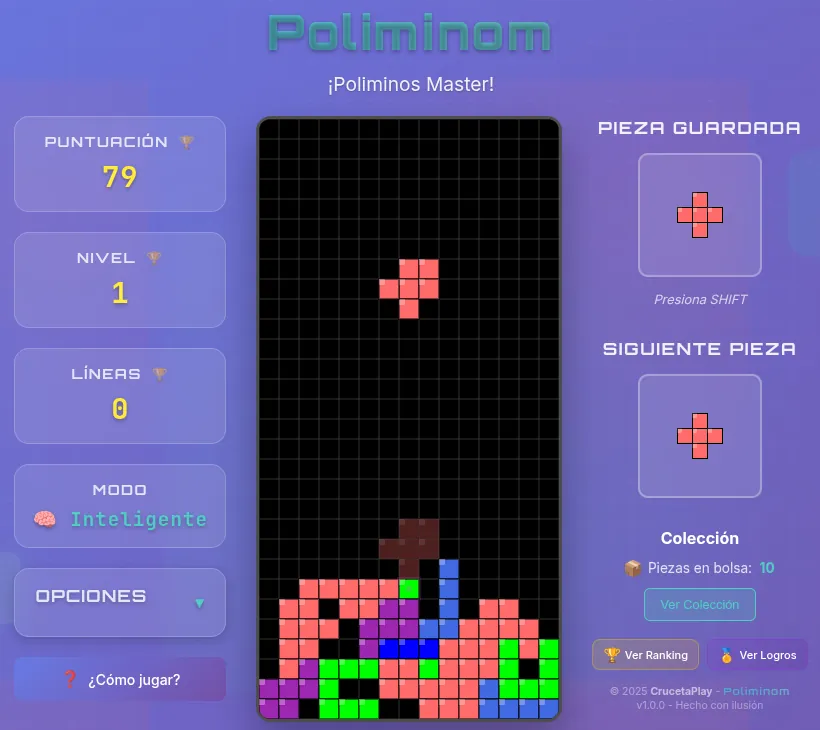
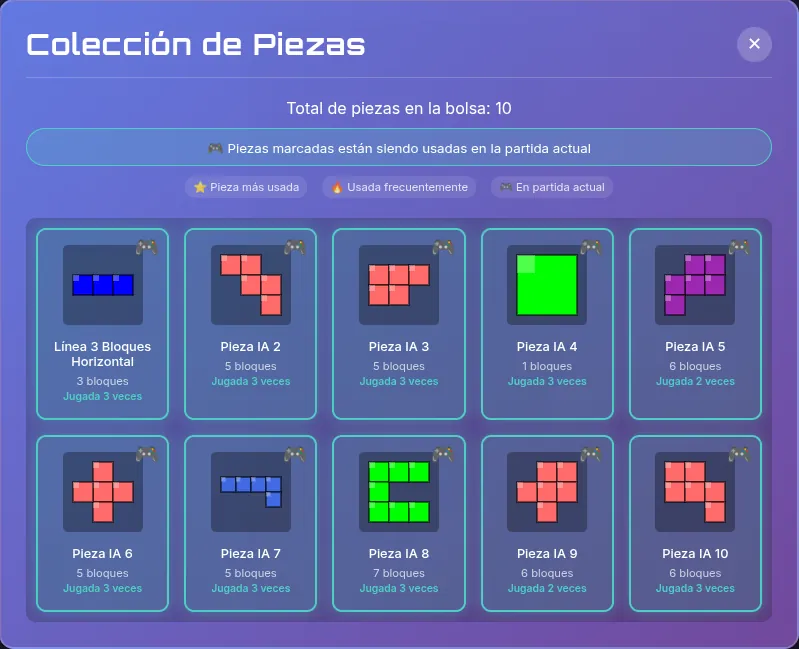
A block puzzle where generative AI (Perplexity, with its Sonar model) creates polyominoes in real time, from 1 to 7 blocks, from classic shapes to completely new ones, each with its own colours. They go into your bag of pieces, and a collection shows every AI piece, how many times you have played it, your most used ones and which are in the current game.
Around them there is a full game: 6 special pieces (a Bomb also clears the line below, Purge disintegrates every block above the completed line, Dizzy inverts the controls, Cursed drops random blocks, and Slowdown and Stressful change the falling speed), a magic elf that appears at random with 1,000 bonus points, holding a piece for later, 16 achievements from Common to Platinum, a global ranking, and options for the grid, the ghost piece, shuffling, sound and music. Its how-to-play guide even explains what a polyomino is.
A game in progress, and the collection of AI pieces in the bag, with how often each one has been played.
Decisions
A budget for the AI. Each player gets up to 20 AI pieces a day, and the backend allows 100 requests every 15 minutes, to prevent abuse.
A hardened backend. The game talks to its own Node.js and Express server, protected with Helmet security headers and CORS.
Progress without friction. Stats, achievements and progress are kept in the browser with a backup on the server, and each player is recognised by a browser fingerprint.
Its own identity. Inspired by the classic puzzle games, but with its own name and mechanics, and pieces, effects and characters created for it, without using any resource from Tetris.
Nothing hidden from the player. Click any special piece on the board to see its name and effect, and active effects are shown in a corner of the board.
Polish where it's felt. Sound effects synthesised in real time with the Web Audio API, gamepad support with custom mapping, and danger alerts in 4 levels.
Where it stands
Playable in any modern browser with nothing to install, free and without ads. It's also one of the games in Smart Tab Saver's games section.
JavaScriptHTML5 CanvasNode.jsExpressPerplexity AI APIWeb Audio API
Game DNA Card · Web app · AI-generated game profiles
The need
One day I didn't know what to play. I was going through the games I had pending, reading reviews, looking at their styles, and I thought: it would be great to choose a game by how I want to feel while playing it, by what the game conveys. A review, after all, is what one person or a few people think of a game. I wanted to know which emotions a game conveys, so you can tell whether it is a game you want to play.
What I built
A website where you paste a review URL or type a game's name and AI generates its DNA card. In the site's own words: "A Game DNA Card is not a review or a rating. It's a unique genetic profile that breaks down the core traits of a game, its mechanics, pacing, difficulty, engagement hooks, and player experience, like a DNA sequence. Think of it as the game's fingerprint."
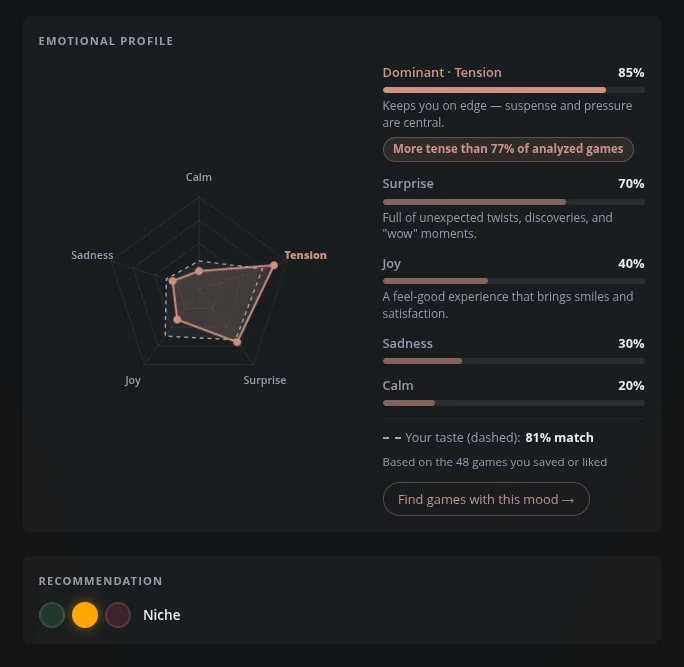
Each card shows engagement, the ideal session (short, medium or long, with playtimes), difficulty from Chill to Masochist, friction, and an emotional profile across five emotions (calm, tension, surprise, joy and sadness), with how the game ranks against the rest of the analysed games. Around it: vibes, platforms, screenshots, similar games, offers from several stores, and a shareable card with a QR code.
The emotional profile of a game, with the visitor's own taste drawn as a dashed line.
How it grew
It went from a card to a tool that gets to know you. As you like games and add them to your lists ("My Games", "Wanna Play", favourites), the site learns which emotions you enjoy in a game and builds your own emotional fingerprint, your player DNA, so it can tell which games are likely to suit you best. Every game's chart then shows how well it matches you.
Compare two games side by side: emotional similarity, gameplay, what they have in common and, with your profile, which of the two fits you better. A comparison can be shared as a link.
Mood Search: drag the emotions on the chart to the profile you're in the mood for, and the games that match it appear as you go. Stressed after a long day? Raise calm, and it shows you relaxing games.
Player DNA: your dominant emotion, your signature game, your top genres and platforms, and analysed games close to your taste that aren't in your lists yet.
A look that follows the mood: the site adapts its visual style and backgrounds to the game you're viewing and its emotions, or to your own profile.
Decisions
Feelings, not scores. A profile of the emotions the game conveys, so you can decide whether it is for you, instead of one more rating to add to the pile of opinions.
Your taste as a reference, not a verdict. It is drawn as a dashed line next to the game's own profile, with the match as a percentage and the number of games it is based on, so you can see why.
Search by how you want to feel, not by genre. Mood Search starts from the emotions you are looking for today and finds the games, not the other way round.
Where it stands
Live and growing, with new DNA cards added every week. It also appears in Smart Tab Saver's "Other Services".
Node.jsExpressSQLitePerplexity AI APISteam APIJavaScript
Pagefy · Browser extension for Chrome · version 1.0.1
The idea
There are music recommenders that go by how you feel or by the atmosphere you want. I thought it would be nice if, while you are on a web page, something recommended music for that very page: reading just enough of it, its meta information and part of its content, to understand what it is about, and putting together a list of songs from Spotify that suit it. Good music that has to do with what you are reading, so the visit is more enjoyable.
It was also a chance to use something I hadn't used yet: Cloudflare Workers, to host the server side.
What I built
A Chrome extension. When you click its icon, it takes the page's titles, headings and part of the main text; an AI (Perplexity, with its Sonar model) works out the moods and music genres that suit it; and the Spotify Web API finds 10 to 15 matching songs. The popup shows the moods and genres it detected, and Premium users can play them all or add them to their queue without leaving the page; everyone else can play them one by one.
On the Cyberpunk 2077 website: the detected moods and genres, and the game's own score among the songs. The interface is in English and Spanish.
Decisions
Read just enough. Only the meta information, headings and part of the text, and only when you ask for it by clicking the icon.
Keys stay on the server. A Cloudflare Worker sits between the extension and the AI and Spotify APIs as a secure proxy.
Remember what was found. Recommendations are cached for 7 days, so going back to a page shows its music instantly.
Feel at home in Spotify. Sign-in with Spotify through OAuth 2.0 with PKCE, and an interface inspired by Spotify's look.
How it turned out
It works really well at telling what music suits a page. On the website of a film like The Matrix it brings up tracks from the Matrix soundtrack along with songs that fit the film; on a game's page, the game's soundtrack and music in the same style. Version 1.0.1 is on the Chrome Web Store, in English and Spanish. The music button in this site's header runs the same technology: the Pagefy backend suggests songs for the page you are on, or for any project in the catalog.
JavaScriptManifest V3Cloudflare WorkersPerplexity AI APISpotify Web API
LinuxStreamDeck · Desktop app for Linux · version 0.4.3 · open source (GPL-3.0)
The need
Elgato only makes Stream Deck software for macOS and Windows. The Linux community has built several good alternatives, and the project credits them openly; this one is different on purpose: OBS Studio at its centre, and everything else a stream needs already built in, with no plugins to assemble and nothing running under Wine.
What I built
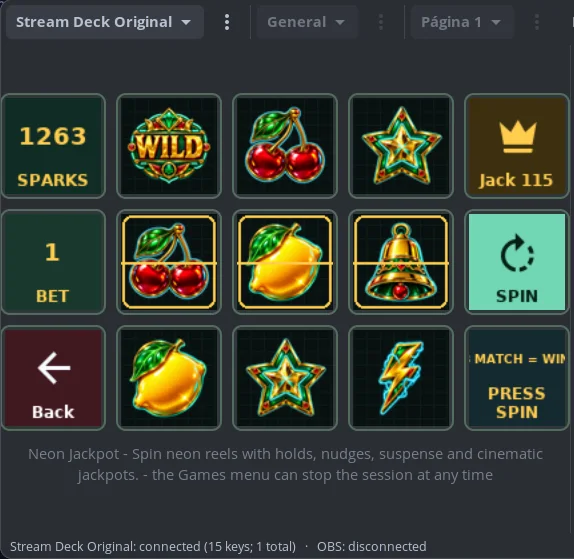
A native GTK4 and Libadwaita application with 71 actions. 29 of them are for OBS and show its live state on the keys, plus a raw request that reaches the whole obs-websocket v5 protocol. It also covers Twitch, Home Assistant, Elgato Key Lights, per-application audio and a soundboard through PipeWire, media players and machine metrics. You can describe a key in plain words and AI builds it, and an Arcade section with 9 games turns the deck itself into the board.
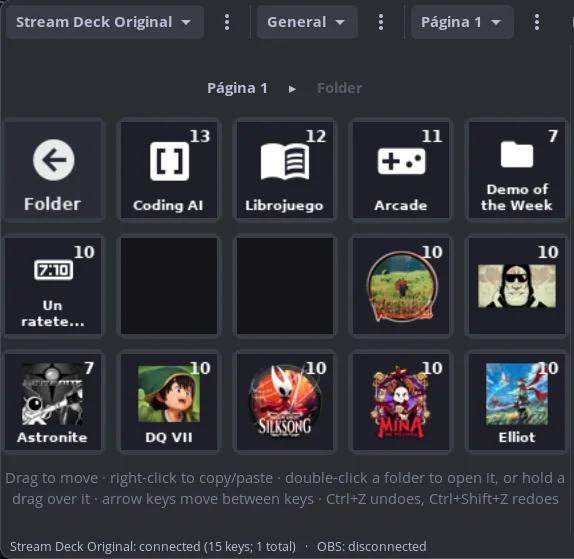
Keys already set up, grouped in a folder, and Neon Jackpot played on the deck itself: the Sparks it wins unlock the other games of the Arcade.
Decisions
A key shows what is happening, not what you last pressed. The active scene lights up, recording turns red and a muted mic is marked, straight from OBS events.
Not ready is not the same as idle. A key that can't work right now is faded, and one whose action just failed gets a red outline for a few seconds, because that is where you are looking.
A dash, never a fake zero. A value the machine doesn't report shows a dash, because a zero is a claim.
Measure what matters. The Twitch key shows how long someone has been waiting in chat, not how many messages there are: a count says nothing about whether you are ignoring someone.
Design for 96 pixels. The now-playing key shows the album art and the artist but not the song title, which would be cut or unreadable at that size; a cover is recognised before you read anything.
Never guess. Keeping the Twitch category in sync with the Steam game being played remembers exact matches, and never guesses when the game is uncertain or two are running.
Say what wasn't checked. The pre-flight check before going live reports on microphones, cameras, disk, CPU, the stream target and the Twitch title, changes nothing, and says plainly what it could not check.
AI where the choice gets hard. With so many actions, building a key meant searching and deciding, even with the action search, and much more so for multi-action keys that run a whole sequence with one press. Now you describe the key in plain words and AI builds it, with your own OpenAI or Claude key.
Hardware made for fun, too. It felt like a waste not to play with those physical keys, so an Arcade section brings 9 games played on the deck itself. They are unlocked with Sparks, the app's own fictional currency: you start with some, win more at Neon Jackpot and earn more through achievements as you use the app. No purchases and no real money.
Useful before the hardware arrives. An on-screen grid mirrors the device, so every key can be configured and tested with no deck plugged in.
Where it stands
Version 0.4.3, free software under GPL-3.0, shipped as a .deb with its source code on GitHub. Built for Wayland, it supports the Stream Deck Mini, Neo, Original/MK.2, Stream Deck + and XL, several of them at once.
PythonGTK4Libadwaitaobs-websocket v5PipeWireTwitch Helix APIOpenAI / Claude API
grabfold · JavaScript page-turn library · open source (MIT) · on npm
The need
In Daily Ocarina, my daily puzzle game, solving the daily challenges earns collectible cards, and I wanted to show them in an album whose pages felt like real paper. I tried existing page-flip libraries, PageFlip and many others, and none had everything I needed or let me customise what I wanted. None had page-turn sounds that sounded real, let alone sounds that tell you which way the page is falling or change with how fast you turn it. None let you turn several pages at once. And I wanted something easy to use, with no dependencies and fully customisable.
What I built
First, the page-turn of Daily Ocarina's album, where the pages had to turn however a player took hold of them. Then I extracted it into a library so it could help more people: much of what I enjoy about making things is that they can be useful to others.
grabfold folds a page from the exact point you grab it, not from a corner: grab the edge high or low and the crease starts there, move your hand as you pull and the crease tilts with it. Around that there are flicks, corner peeks, hard covers, spreads on wide screens and single pages on phones, right-to-left and top bindings, an optional WebGL page curl, plugins (thumbnails, zoom, fullscreen) and adapters for React, Vue, Svelte and Web Components.
Decisions
Real paper geometry, not a corner animation. The fold is the perpendicular bisector of where you took hold and where your hand is now, so the page stays bound to the spine however it is dragged and lands square on the facing page.
A sound that follows the page. Optional page-turn sounds, synthesised from scratch with no samples, timed so the page is heard landing when it is seen landing: a full turn plays the whole sound, a page let go near the end gets little more than the landing, and a drag dropped early stays silent. Turning back mirrors the stereo, so the sound travels the way the page does. It never plays the same take twice in a row, and hard covers sound like card.
Hands, not just drags. A quick flick turns a page however little it was pulled, and a block of pages can be taken from the edge of the stack and turned at once. Jumping ten pages is one turn, like riffling a block of pages with your thumb.
Zero dependencies, and you only pay for what you use. The core is about 11 kB minified and gzipped; sounds, WebGL, plugins and each framework adapter are separate entry points.
Your pages, untouched. Each page is painted once and moved through the turn, never cloned, so it keeps its state, its loaded images and its event handlers.
Easy to start, open about its limits. A live configurator writes the setup code for you. The README credits StPageFlip for the idea of doing the turn in 2D, and lists what is still missing.
Where it stands
Published on npm and GitHub under the MIT licence, with a demo site and an end-to-end test suite that turns real pages in Chromium, Firefox and WebKit. It turns the pages of Daily Ocarina's album and of this portfolio's Book view. Next on its roadmap: accessibility, so pages are announced and a turn can be driven entirely by assistive technology.